

 FAQs
FAQsLayout
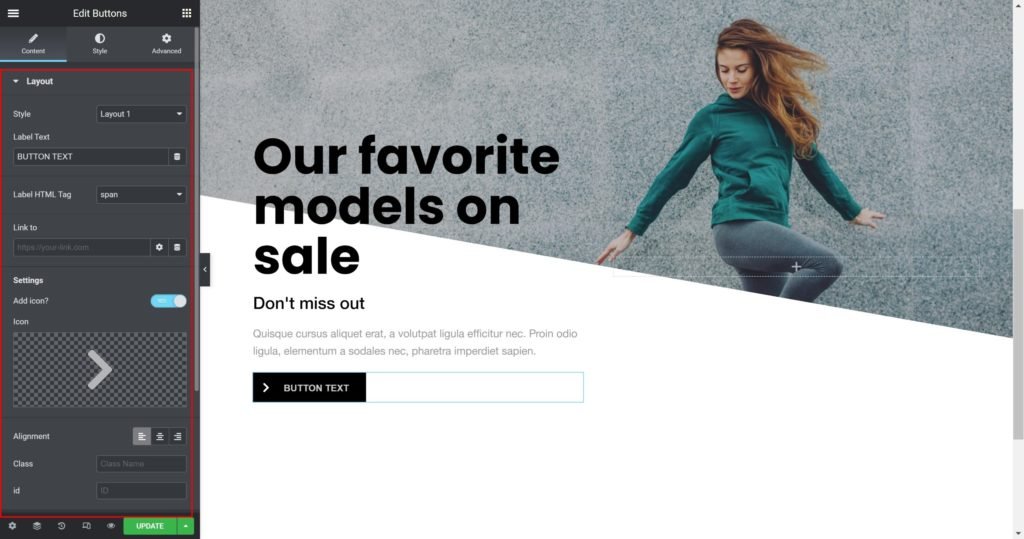
Shows a list of all the items in the slide. You can drag and drop them to change their order. Click on the Add Item button to add another item to the list.
- Style: Choose your button style from the list.
- Label Text: Enter the button custom text
- Label HTML Tag: Wrap the label with a tag, either H1…H6, span, div or paragraph.
- Link to: Add a URL of the button.
- Add icon? Choose whether to show or hide the icon.
- Icon: Choose from a list of Font Awesome icons.
- Alignment: Align the content to the right, left or center.
Style
Box:

- Container Width: Set the width of the outer container.
- Fixed Size: Set the width and height of the button.
- Padding: Set the inner spacing between the edge of the content and the edge of the slide.
- Background Color: Set the background color of the overlay when you hover over the image.
- Border color: Choose the border color.
- Border Type: Select the border type, from none, solid, double, dotted, dashed, or grooved.
- Border Radius: Set the border radius for the images to control corner roundness.
- Border Width: Control the thickness of the border.
- Box-shadow: Give the search bar a box shadow.
Label:

- Title Typography: Customize the typography of the Title.
- Color: Set the post’s Title color. The title appears within the overlay when you hover over the image.
- Margin: Set the outer spacing between the edge of the Title and the edge of the item slide.
Navigation:

- Color: Set the color for the controls.
- Margin: Set the outer spacing between the edge of the button and the edge of the slider.
- Padding: Set the inner spacing between the edge of the button and the edge of the slider.
- Font Size: Customize the size of the button text.
- Add space after icon: Set the inner spacing between the text of the button and the edge of the icon.
- Move icon Vertically: Set the vertical position of the icon.
