

 FAQs
FAQsPage Attributes
You can select page attributes on right sidebar of page admin layout. Each Page templates have each styles
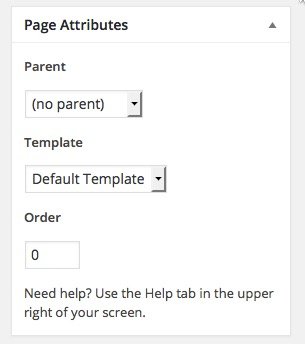
b. Page configure default template
For each page, you can change the page layout style, header skin, footer skin, and much more! Check the screenshot and read the documentation to see how it works
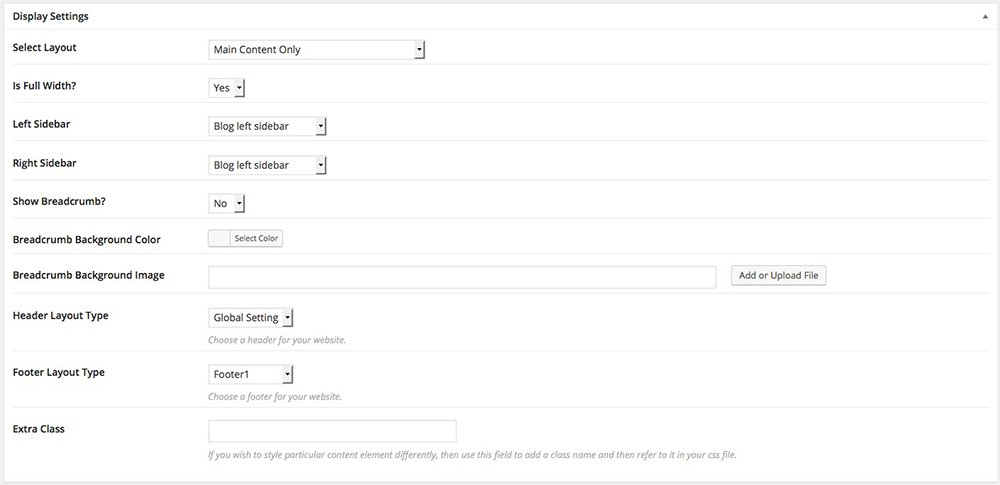
- Enable Fullwidth Layout – Select if you want the page to have a Fullwidth layout.
- Header Layout – Select skin specific for the Header on page or use Global
- Footer Layout – Select skin specific for the Footer on the page or use the Global sidebar.
- Disable Breadcrumbs – Select if you want to disable the subtitle and breadcrumbs.
- Breadcrumbs Text Color – Select the color for the text of breadcrumbs.
- Breadcrumbs Background Color – Select a color background for breadcrumbs.
- Breadcrumbs Background – Select an image to set the background.
- Layout Style – Select style for the page to have an Auto, Left-Main Sidebar Main-Right Sidebar, or Left-Main-Right Sidebar.
